How to use a japa counter on your phone.
Count mantra repetitions in rounds of 108 on iPhone or Android, with a goal that resets each round, rounds you can check and a running total.
To use a japa counter on your phone, create a counter with step 1, initial value 0 and a target of 108, and set it to reset when the target is reached. Tap once after each repetition. On the 108th tap the count returns to zero, the phone vibrates differently, and the history records the completed round with its time.
The 108 is rarely the hard part. A mala keeps your place within a round. The rounds are what slip: somewhere in the fourth, your attention wanders, and afterwards you cannot say whether it was the fourth or the fifth. The setup below keeps the repetitions, the rounds and, if you want one, a running total.
This guide uses Tally Counter, the app behind this blog. You choose the mantra, the bead count and the number of rounds from the practice you already follow. The app records the taps you make; it does not listen to or detect recitations.
Three numbers you might want to keep
A japa count has up to three levels: repetitions within a round, rounds in a session, and a total across days. The main body of a mala usually has 108 beads, smaller malas use 54 or 27, and a separate guru bead is not counted, as the Wikipedia article on the japamala describes. Some prayer beads carry extra counter strands just for recording rounds.
A phone can hold any of the three. Pick the setup that matches how you count now:
| How you count | Counter setup | What the number shows |
|---|---|---|
| Phone only, one tap per repetition | Step 1, target 108, reset | Repetitions in the current round |
| A mala for the beads, the phone for rounds | Step 1, target = your rounds, stop at target | Rounds completed today |
| A total over weeks or months | Step 108, keep counting | Total repetitions |
You can combine them: the first counter for every repetition, plus one of the others that you tap once after each round.
Set up one round of 108
Create a folder called Japa and add a counter. Name it after your mantra, or simply Round. Use these settings:
| Setting | Value | What it means |
|---|---|---|
| Initial value | 0 | Where each new round starts |
| Current value | 0 | Nothing recorded yet |
| Step | 1 | One tap records one repetition |
| Goal | On, target value 108 | One full round |
| When the target is reached | Reset | The count returns to 0 for next round |
If your mala has 54 or 27 beads, use that as the target instead. Turn off allow values below the initial value, so an extra subtraction cannot take the count below zero.
Before the first real session, make a temporary counter with a target of 5 and tap through it. With vibration on, the tap that reaches the target vibrates differently from an ordinary tap; with sound on, it plays a different sound. Once you know how that feels, you can count a round with your eyes closed and still notice its end. Delete the temporary counter afterwards so its taps stay out of your japa history.
What happens on the 108th tap
At 107, the next tap reaches 108 and the screen shows 0 straight away. You will not see 108 on the display; the vibration is the signal. The history keeps two rows for that moment, both with the same time: a +1 that took the count to 108, and a Reset from 108 to 0.
That makes the history a round count. Filter it to today, and each Reset row is one completed round, with the time you finished it.
Two habits keep that count honest:
- Reset only at the end of a round. A reset you make by hand also appears as Reset, so it would read as an extra round later. If you need to start a round again, edit the current value instead; the history labels that change Edited.
- Want to see 108 before you go on? Choose stop at target instead. The count stays at 108 and further taps add nothing until you reset it yourself. Each of those resets still marks one round in the history.
Keep the rounds in front of you
The history is a record, not a display. To see how many rounds you have done while you count, add a second counter to the Japa folder called Rounds today: step 1, initial value 0, a target of your rounds and stop at target. Tap it once each time the round counter gives its vibration.
The two counters are independent. Reaching 108 on one does not add to the other, so the tap on Rounds today is yours to make. Reset it at the start of each day.
If you already count the beads on a mala, this is the only counter you need. Tap it when you come back to the guru bead. The mala keeps your place within the round; the phone keeps the rounds, with a time on each.
Keep a running total across weeks
Some people work towards a large number of repetitions over months. For that, make a counter called Total with step 108, initial value 0 and keep counting. One tap after each completed round adds 108, so the counter shows repetitions, not rounds. Do not reset it; the history keeps every round you added, and when.
Here is one illustrative week at four rounds a day, with one short day. Use your own numbers.
| Day | Rounds | Repetitions | Total after the day |
|---|---|---|---|
| Mon | 4 | 432 | 432 |
| Tue | 4 | 432 | 864 |
| Wed | 2 | 216 | 1,080 |
| Thu | 4 | 432 | 1,512 |
| Fri | 4 | 432 | 1,944 |
| Sat | 4 | 432 | 2,376 |
| Sun | 4 | 432 | 2,808 |
Twenty-six rounds of 108 make 2,808 repetitions. Wednesday’s history shows two +108 rows instead of four, so a later look tells you the day was short without relying on memory. Detailed statistics, such as daily changes over 7, 14, 30 or 90 days, are part of Premium; the history and CSV export are free.
Count without watching the screen
Turn vibration on so each tap is confirmed, and turn sound off if you count in a quiet room. Turn on keep screen awake so the phone does not lock in the middle of a round, and use the dark theme if a bright screen bothers you.
Volume-button counting lets you count with the phone in your hand instead of tapping the glass. Volume up adds one; volume down subtracts one. On iPhone and Android it works only while that counter’s screen is open, the app is in the foreground, the phone is awake and the counter is unlocked, with the settings sheet closed. A locked phone stops it, which is one more reason to keep the screen awake. To count from your wrist instead, see how to use a tally counter on Apple Watch.
Pause and correct a count
If you stop at 63, leave the counter at 63 and carry on from 64 when you come back. A reset is for starting a new round, not for putting the phone down. Lock the counter screen while the phone is put away, and unlock it there before you continue. Do not rely on that lock to block home-screen widget taps.
For an extra tap partway through a round, subtract one straight away. The history keeps both the tap and the correction, each with its time.
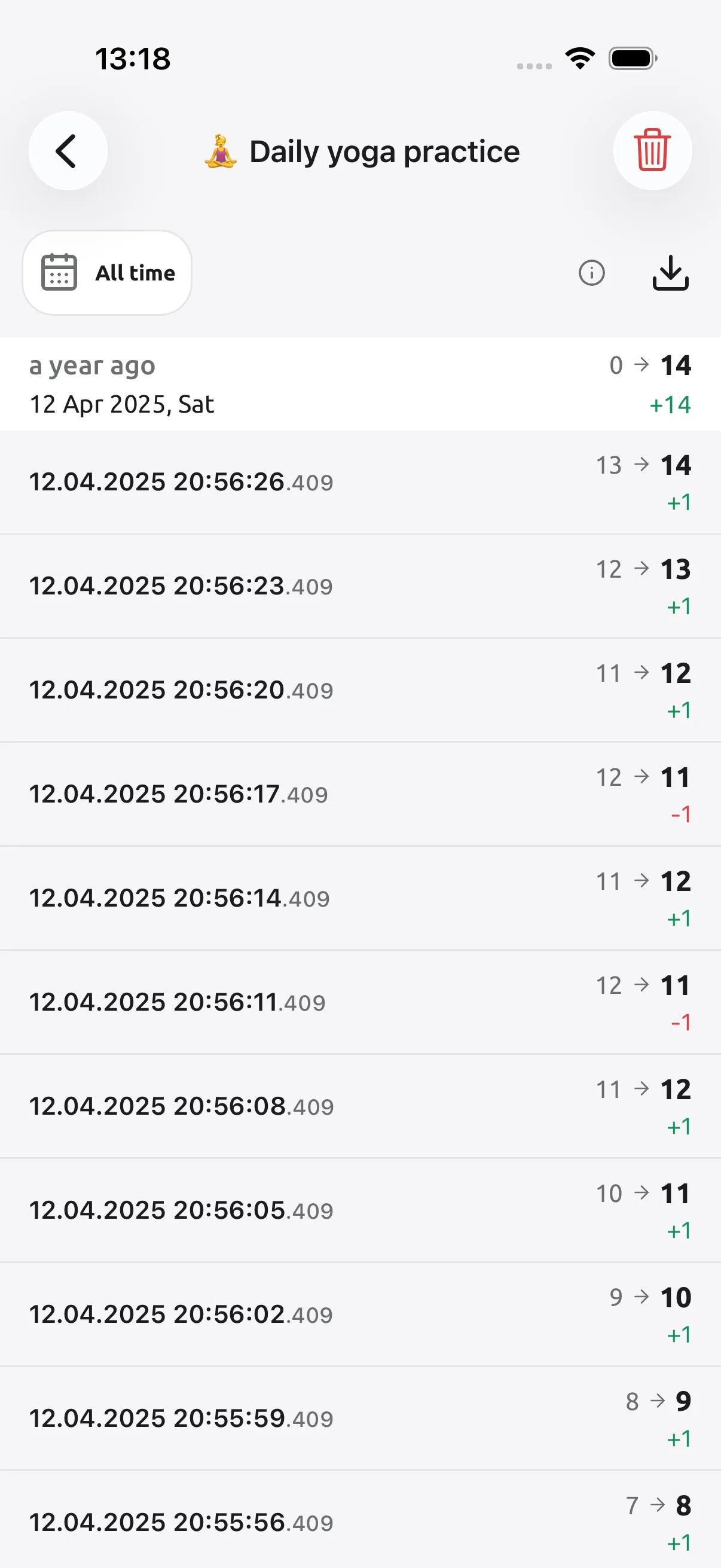
An extra tap at 107 is the awkward one, because it completes the round and resets the count to 0, where subtracting does nothing. Edit the current value back to 107 instead. The history then shows a Reset followed by an Edited row; skip that Reset when you count rounds.
What the counter cannot do is recover a repetition you never tapped. If you lose your place mid-round, how you pick it up again belongs to your practice. The counter holds whatever number you leave it on.
Common questions
Can I count japa without a mala? Yes. Make a counter with step 1 and a target of 108, set it to reset, and tap once after each repetition. A different vibration marks the end of each round.
How do I know how many rounds I have done? Filter the counter’s history to today and count the Reset rows, one per completed round. To see the number while you count, add a Rounds today counter and tap it after each round.
Can I use a mala with 54 or 27 beads? Yes. Set the target to the number of beads you count in one round.
Can I count with my phone locked? Not with the volume buttons. They need the counter screen open and the phone awake, on iPhone and Android. Turn on keep screen awake for a long session.
Does it work offline, and do I need Premium? Counting works offline, with no account. Counters, folders, goals, history and CSV export are free. Premium adds reminders, detailed statistics, history notes and PDF export; this setup does not need them.
Start with one round
Make the round counter, try the target once with a short temporary count, and add Rounds today or Total only when you want them.
Mantra counting is one of fifteen uses for a tally counter. For dhikr counts, see how to use a tasbeeh counter. Get Tally Counter for iPhone and Android, or see the features.